
A pricing test should answer a decision you need to make. “What should we charge?” leaves too much room for interpretation. A useful study asks a narrower question:
- Which price range feels credible for this product?
- Which of three proposed prices produces the strongest demand and modeled revenue?
- Which features deserve the most weight in the offer?
- Which package combinations win when customers must make a trade-off?
Each question calls for a different research method. Start there. The survey, analysis, and sample plan should follow the decision.
Choose the decision before the survey
Founders lose time when they collect general opinions and try to turn them into a price. A study works better when the planned decision appears in the research brief.
Write one sentence before you build the survey:
We will use this study to decide ______.
Fill the blank with a decision your team can take after reviewing the results. “Choose between $59, $79, and $99” gives you a usable finish line. “Learn about willingness to pay” describes a topic.
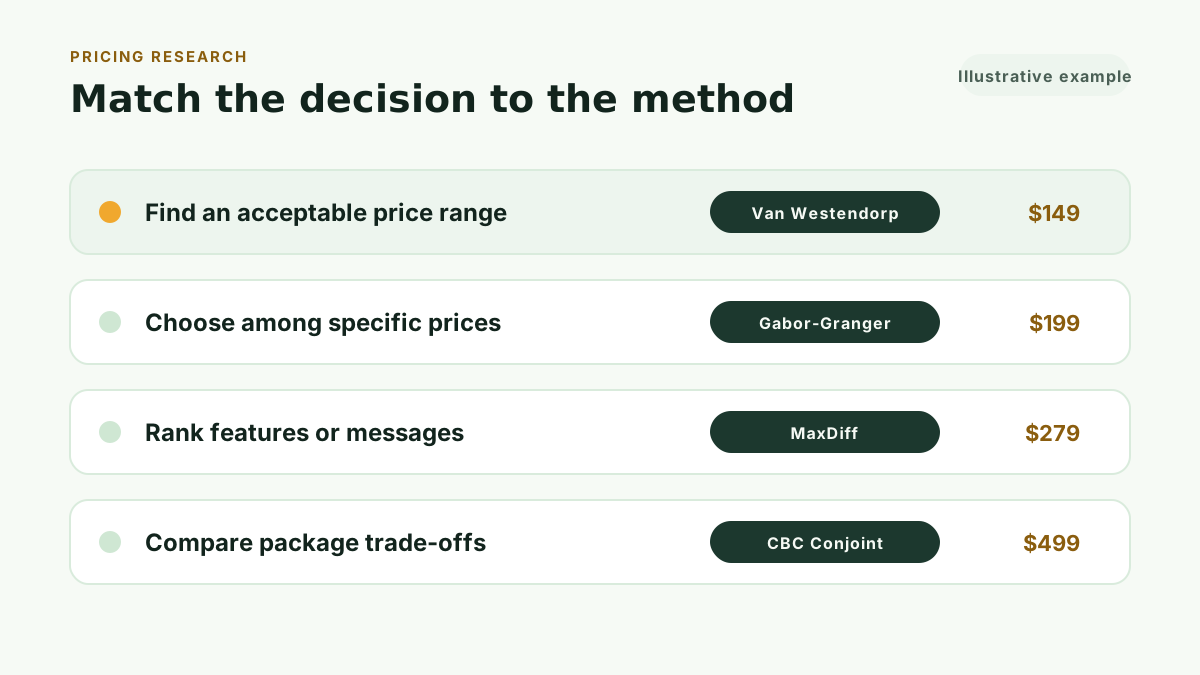
Four methods cover the main SaaS pricing decisions:
Find an acceptable price range with Van Westendorp
Van Westendorp asks customers for four price thresholds: too cheap, a bargain, expensive but worth considering, and too expensive. The analysis turns those answers into an acceptable range and four reference points.
Use it when you need boundaries before selecting proposed prices. Qualtrics describes Van Westendorp as a direct pricing method that constructs a range from four questions. Read our guide to Van Westendorp pricing research for SaaS founders for the survey design and analysis, or start with how to find the right price range for a SaaS product for the range-first workflow.
Test specific prices with Gabor-Granger
Gabor-Granger presents a price and asks whether the respondent would buy. Each answer moves the respondent toward a higher or lower price. The results show purchase intent at each tested price, a demand curve, and a modeled revenue curve.
Use it when you have a defined set of prices and need to compare them. Qualtrics lists the demand curve, revenue curve, and revenue-maximizing tested price as the core outputs. Our walkthrough of how to test SaaS price points with Gabor-Granger covers price selection, the demand curve, and the modeled revenue comparison.
Rank features or messages with MaxDiff
MaxDiff shows customers small sets of options and asks them to choose the most and least important item. Repeated trade-offs create a relative priority score for each option.
Use it when a long list of features, benefits, or messages all look important in a rating survey. Sawtooth Software explains that MaxDiff breaks a large list into smaller best-worst tasks. See MaxDiff analysis for the full MaxDiff process.
Compare packages with CBC Conjoint
CBC Conjoint asks customers to choose between packages that vary across price and product attributes. The analysis estimates how each attribute contributes to preference and lets you compare package configurations.
Use it when price, limits, and features work together. Conjoint requires more setup than a range or price-point study because the package design becomes part of the research. Our guide to comparing SaaS packages with conjoint analysis covers attributes, choice tasks, and the package simulator.
Recruit customers who understand the choice
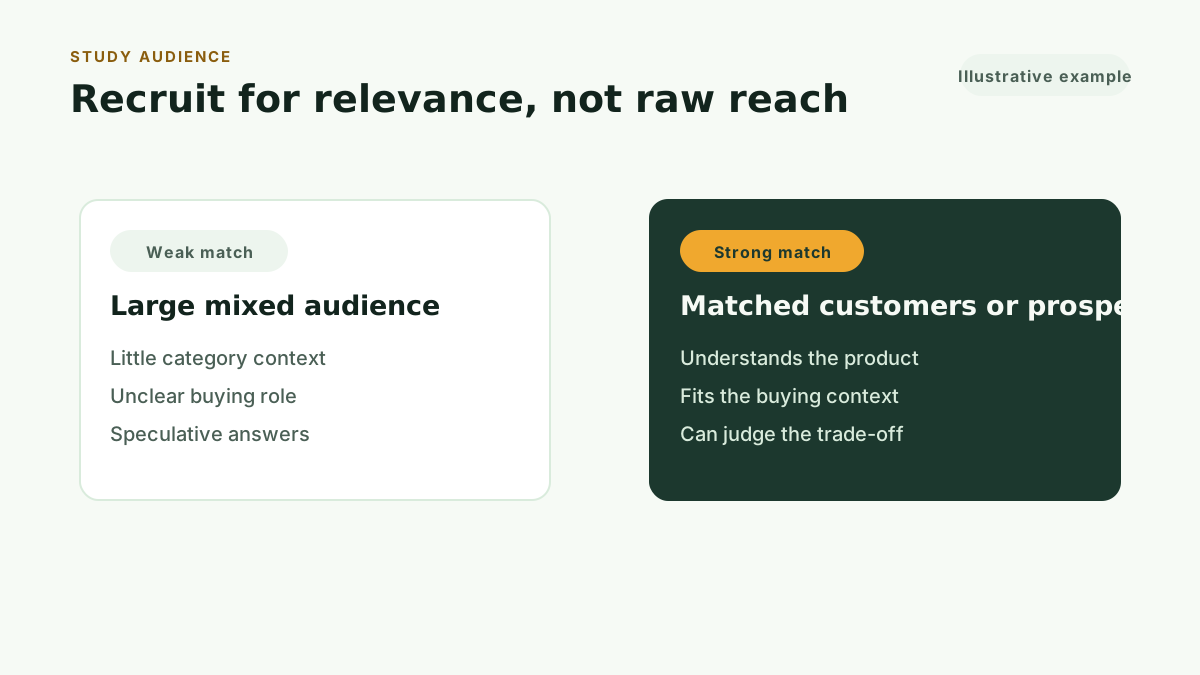
The right audience can judge the offer you describe. Reach alone does not create a useful sample.
Current customers can evaluate a repricing decision because they understand the product and the problem it solves. Trial users can contribute when they reached the parts of the product connected to the offer. Qualified prospects can help with a launch study when they face the problem, understand the category, and match the expected buyer.
A general startup audience may know SaaS while lacking the context to judge your product. Their answers can reflect abstract budget preferences instead of the buying decision you need to study.
Define your audience in operational terms:
- Role in the buying decision
- Company or customer type
- Experience with the problem
- Recent use of your product or a credible alternative
Give every respondent the same offer
Price answers depend on what the customer thinks they are buying. Describe the product, billing period, included usage, buyer, and outcome before the pricing questions.
Keep that context stable across the study. A $79 answer means little if one respondent imagines a starter plan and another imagines an unlimited team plan.
For an existing product, use the language customers already see in the product and on the pricing page. For a new offer, show a short concept that a prospect can judge. Avoid a roadmap disguised as a package.
Keep the survey focused
The pricing method should do the hard work. Extra questions should earn their place.
Use screening questions to confirm audience fit. Add a small number of context questions when they help you review the result. Long demographic sections create more work for the respondent and can reduce completion.
Preview the survey on desktop and mobile. Check the product description, price units, currency, billing period, option order, and completion state. Ask one person who did not build the study to explain what they think the offer includes.
Treat responses as evidence, not transactions
A survey measures stated choices inside a research exercise. It does not guarantee that every respondent will buy at the price they selected.
Use the result to reduce uncertainty and make a sharper pricing decision. Add business context such as acquisition channel, gross margin, support cost, sales motion, and rollout risk. Then watch what customers do after launch.
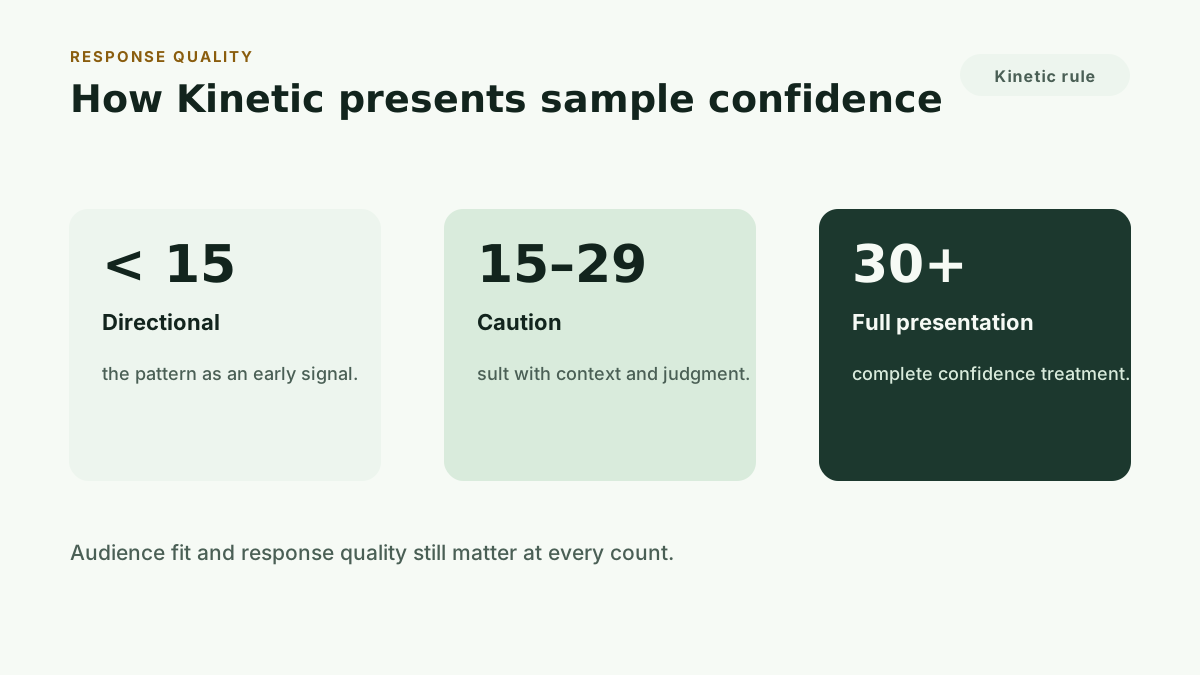
Kinetic changes its results presentation as the number of valid responses grows. Fewer than 15 responses receive a directional label. Studies with 15 to 29 responses receive a caution treatment. Studies with 30 or more responses receive the full-confidence presentation.
These bands describe the Kinetic product experience. They do not replace a formal sample-size calculation for every market or research design.
Connect the study to an action
A useful workflow has five parts:
- State the pricing decision.
- Choose the method that answers it.
- Recruit customers who can judge the offer.
- Review the calculated result and its limits.
- Record the decision, rollout, and follow-up measure.
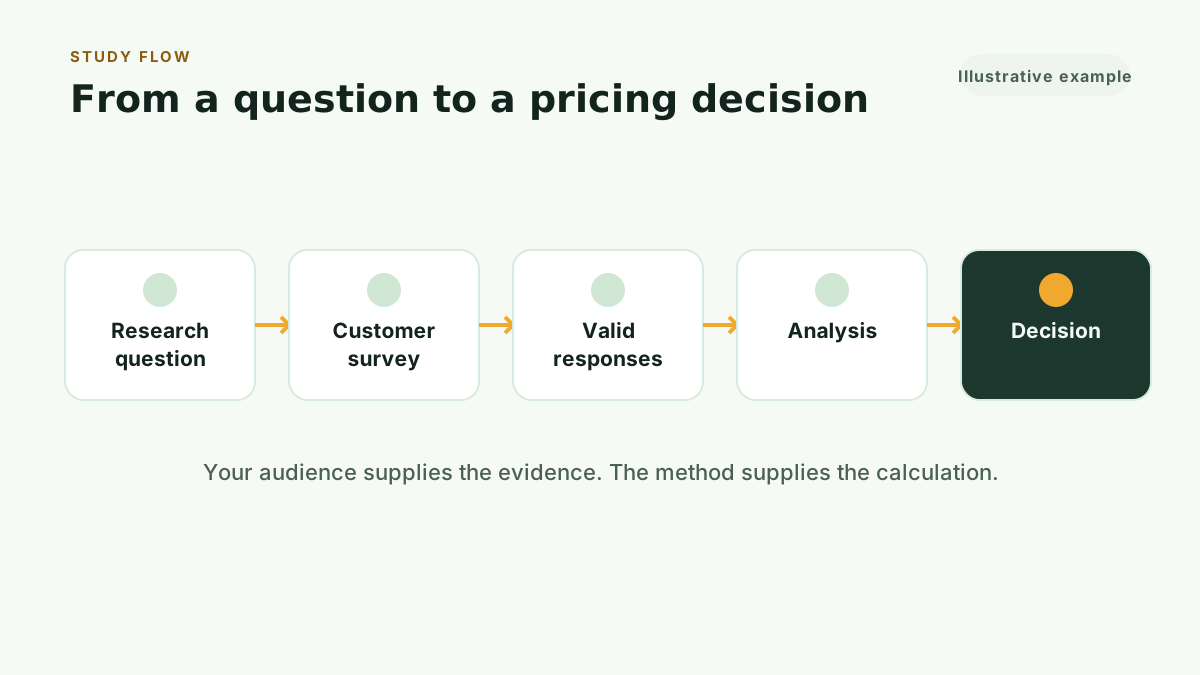
The fifth step prevents the research from ending as a chart. Write down the price or package you chose, the evidence that supported it, the assumption that still carries risk, and the date you will review the outcome.
Kinetic Workspace provides Decision Records, outcome checks, reminders, and a Revenue Scenario Planner for this work. The scenario planner keeps customer evidence separate from business assumptions while calculating conservative, base, and upside cases.
Common pricing-test mistakes
Asking customers to invent the price
One preferred-price question produces a pile of numbers with no shared definition. Use a method that gives each answer a role.
Testing people who cannot judge the offer
Audience mismatch can create a polished result for the wrong buyer. Define eligibility before sending the link.
Changing the offer inside the study
Respondents need one stable product and billing context. Mixed descriptions make the price answers hard to compare.
Treating the highest modeled result as a command
Research supports a decision. Your costs, positioning, sales motion, and rollout constraints still belong in the decision.
Collecting results without a follow-up plan
Choose the outcome you will monitor before launch. Possible measures include paid conversion, plan mix, churn, expansion, sales-cycle length, and support load.
Run this method with your users
Kinetic Pro includes unlimited customer-recruited studies across all four methods, three seats, and Kinetic Workspace for $99 per month or $990 per year. The monthly plan starts with a 30-day free trial: card required, cancel anytime.
For a single decision, Kinetic Pricing offers four self-serve studies using your own customers or prospects:
- Advanced Van Westendorp: $149
- Gabor-Granger: $199
- MaxDiff: $279
- CBC Conjoint: $499
If you are weighing this against hiring a firm, see how to do pricing research without hiring a consultant.
Start 30-day free trial to run every method with your users, or Buy one study and start with the decision you need to make.