
Conjoint analysis tells you how customers value the parts of your offer when they cannot have everything. Most pricing questions study one number. Packaging questions are harder, because price, limits, and features move together, and customers trade them against each other in ways a rating survey never shows.
Choice-based conjoint, or CBC, shows customers a set of realistic packages and asks which one they would choose. Across many of these choices, the analysis estimates how much each attribute and price level drives preference, then lets you simulate the share of customers who would pick one package over another.
Use CBC when you need to design or price tiers, not when you need one price for a settled offer. Reach for a price-range or price-point method when the package is fixed and only the number is open.
Start with the decision the packages serve
Write one sentence before you design the study:
We will use this study to decide ______.
Fill the blank with a packaging choice your team can act on. “Decide whether advanced permissions belong in the $79 tier or the $149 tier” gives you a finish line. “Understand how customers feel about our plans” describes a topic.
The decision sets the attributes. A study built to place two features and one price point does not need ten attributes. It needs the few that carry the decision.
Choose attributes and levels that map to real decisions
A conjoint study has attributes and levels. Attributes are the levers you can change: price, seats, a usage limit, a headline feature, the support tier. Levels are the concrete options for each lever, such as $49, $99, and $149 for price, or 5, 25, and unlimited for seats.
Keep the design disciplined:
- Use a small set of attributes. Sawtooth Software notes that too many attributes tire respondents and weaken every estimate.
- Keep attributes independent. If two levers always move together, the model cannot separate their effects.
- Make levels plausible and mutually exclusive. Every level should be one you would actually sell.
- Treat price as a first-class attribute with realistic steps. Conjoint measures price against features only when price varies like the rest.
Write each level in the language customers see in the product and on the pricing page, not in internal names.
Show choice tasks, not ratings
Each respondent sees a small set of packages that vary across the attributes, plus a “none” option, and picks the one they would choose. The survey repeats the task several times with different combinations, using a balanced design that controls how often each level appears.
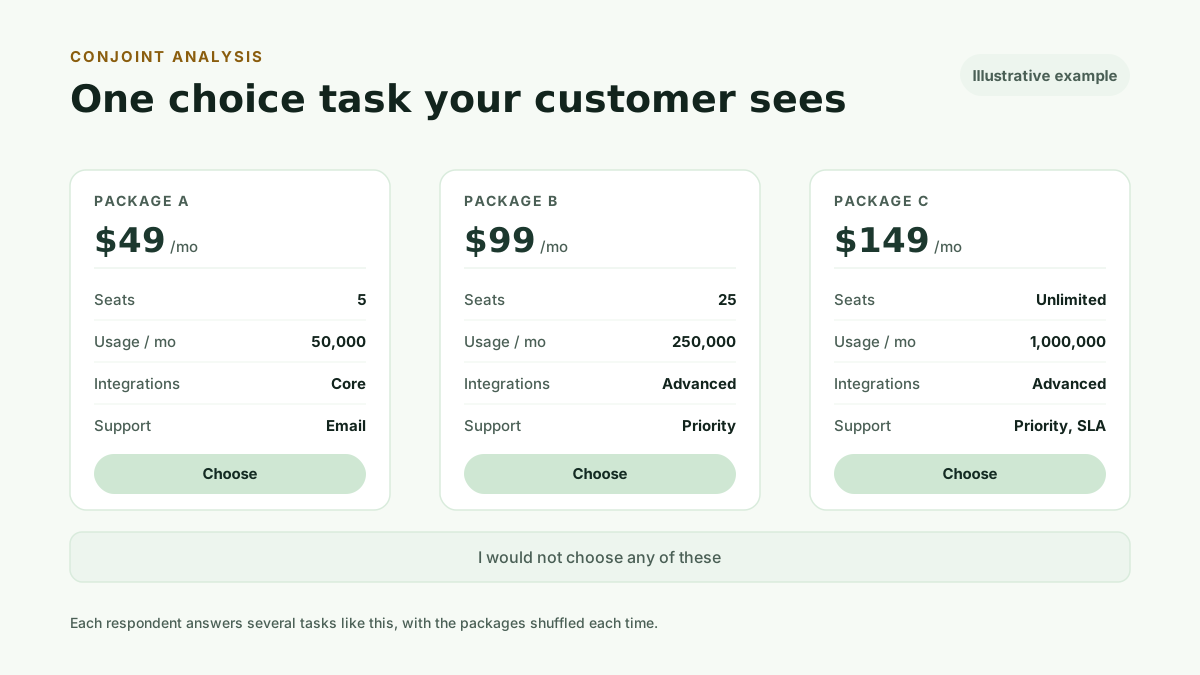
One choice reveals a preference inside one set. The full design creates enough comparisons to estimate the value of every level across the whole audience. A rating survey, by contrast, lets a respondent call everything important, which gives you no separation for a packaging decision.
Discrete choice experiments and conjoint analysis
Choice-based conjoint is a discrete choice experiment. The academic literature developed the design under that name, usually shortened to DCE, and fields such as health economics and transport research still publish with it. The commercial research industry markets the same design as conjoint analysis, and software vendors document it as CBC.
The names describe one method. Respondents choose among constructed alternatives whose attributes vary by design, and a choice model estimates how much each attribute level drives the decision. Sawtooth Software's CBC documentation and the discrete choice literature describe the same machinery with different vocabulary.
This matters in one practical way when you read source material. A search for conjoint analysis surfaces vendor guides focused on study design, while a search for discrete choice experiments surfaces papers focused on estimation and validity. Both bodies of work apply to the study this article describes, so read them as one literature rather than choosing a camp.
Estimate what each attribute is worth
The model estimates a part-worth utility for every level, then combines them into attribute importance: how much each lever moves the choice across the study.
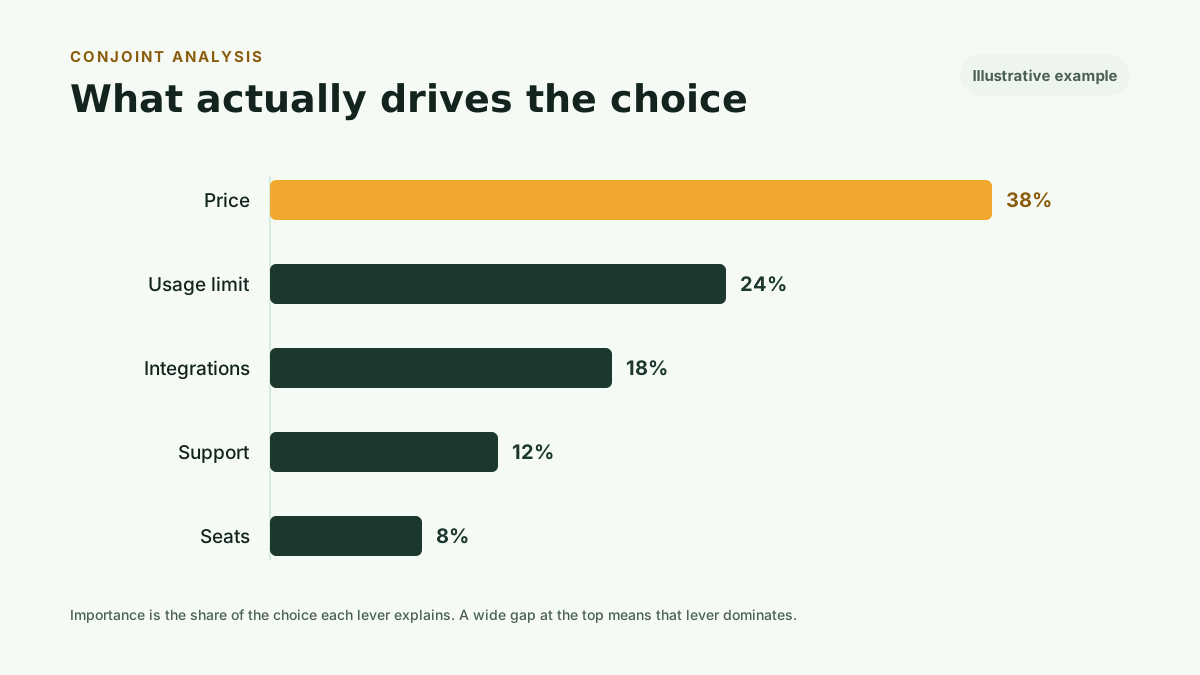
Read the spacing next to the order. A large gap between the top lever and the rest means that lever dominates the decision. A cluster of similar values means several levers matter together. This is where a bundled value metric shows itself. If a usage limit drives choice far more than seats, then metering by seats is charging for the wrong thing.
A worked conjoint example
Here is one complete pass through the machinery, with every number simulated.
Suppose a study tests three attributes. Price has three levels: $29, $59, and $99 per month. Seats has two levels: 5 seats and 20 seats. Support has two levels: email support and priority support.
One choice task shows the respondent three packages built from those levels. Package A offers 5 seats with email support at $29. Package B offers 20 seats with priority support at $59. Package C offers 20 seats with email support at $99. The respondent picks the package they would choose, or none of them.
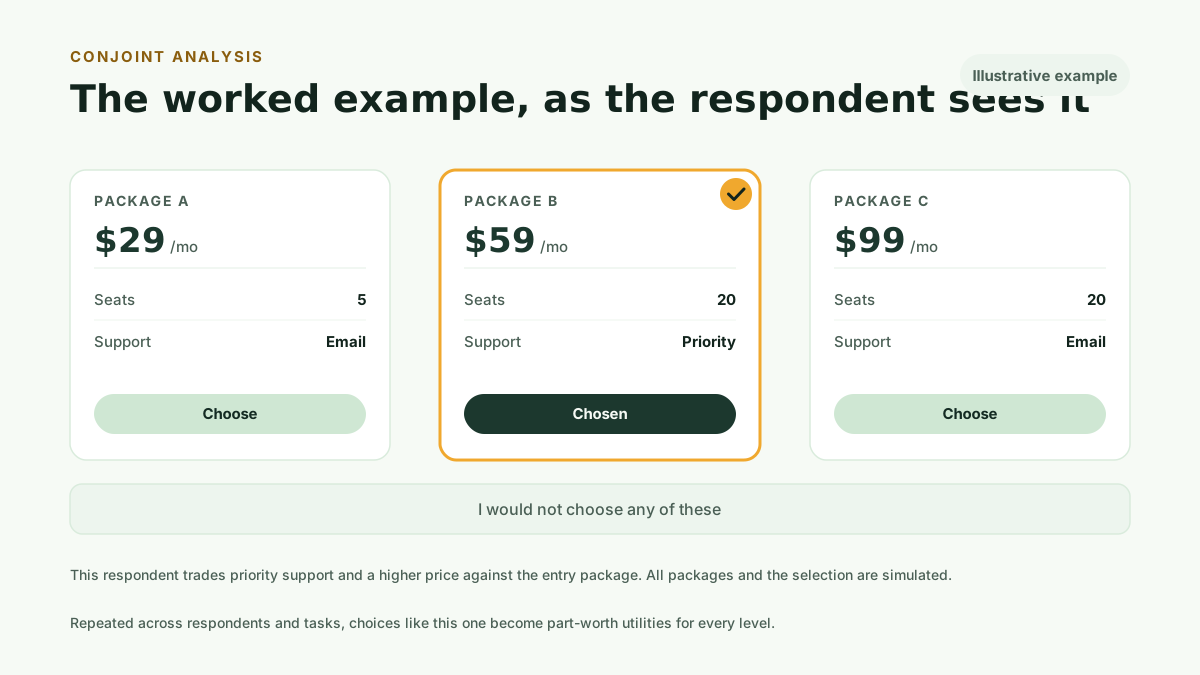
Across many respondents and repeated tasks, the model estimates part-worth utilities. In this illustrative example: moving from 5 to 20 seats adds 0.9, priority support adds 0.4, and dropping the price from $99 to $59 adds 1.1, with a further 0.6 from $59 to $29.
Read the utilities as trade-offs. The seat upgrade, at 0.9, is worth less to this audience than the price drop from $99 to $59, at 1.1, so a $99 high-seat package fights its own price. The support upgrade, at 0.4, is the weakest lever, so it belongs in a higher tier as a differentiator rather than a reason to buy.
The package decision follows from the numbers. Lead with a 20-seat tier at $59, keep a $29 entry tier at 5 seats, and hold priority support for the premium rung. Every number here is simulated. A real study replaces them with the choices your customers make.
Simulate packages before you build them
The most useful output is a market simulator. You define candidate packages from the levels you tested, and the model predicts the share of customers who would choose each one, including against your current tiers or a competitor.
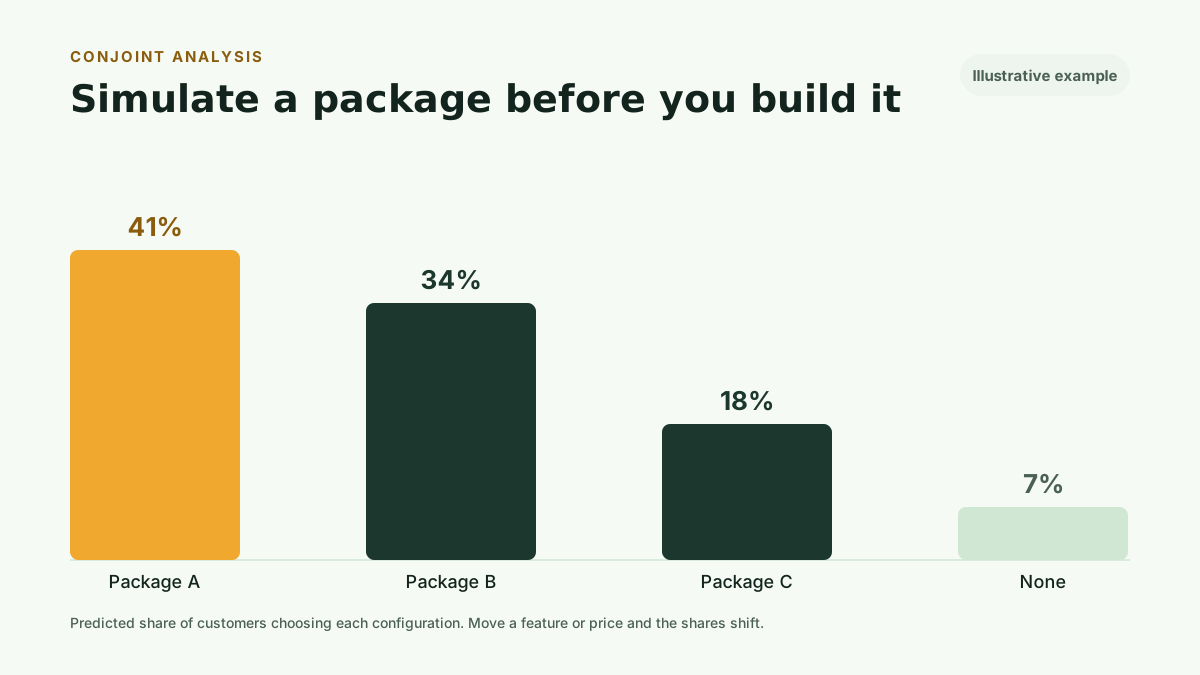
Use it to answer real design questions. Move a feature up one tier and watch the share shift. Add a middle rung and see whether it grows total preference or only cannibalizes the tier beside it. Raise a price and read where you lose the least share. The simulator turns a static ranking into a set of decisions you can test on screen before you build anything.
Use conjoint for packaging and tiering
Conjoint fits the decisions a single-price study cannot reach:
- Which features justify a higher tier, and which belong lower to widen the entry point.
- Whether your value metric matches what customers pay for, such as usage against seats.
- Where a price change costs the least share of preference.
- Whether a new middle tier grows the market or splits an existing one.
Add the business facts customers cannot calculate: gross margin, cost to serve, sales motion, and positioning. A high-share package can still fail the model if it gives away the feature that protects your margin.
Sequence conjoint with the other methods
Each method answers a different question, and they work well in order:
- Run MaxDiff first when a long feature list needs shortening, so the conjoint study tests only the levers that matter.
- Use Van Westendorp or Gabor-Granger when the package is settled and you need one price.
- Use conjoint when price, limits, and features move together and you need to see the trade-offs.
The full walkthrough of choosing a method sits in how to test SaaS pricing with real customers.
Know what conjoint cannot answer
Conjoint measures stated choices inside a survey. It does not observe purchases, so treat the share numbers as research evidence, not a revenue forecast.
The model reflects the attributes and levels you included. It says nothing about a lever you left out, and nothing about levels beyond the range you tested. A sound design and enough responses matter more here than in a single-price study, because the model estimates many values at once.
Conjoint also does not set your price by itself. It shows how customers trade off the offer. Margin, cost to serve, and strategy still make the decision.
Avoid five conjoint mistakes
Testing too many attributes. A long attribute list tires respondents and thins every estimate. Test the few levers that carry the decision.
Using attributes that move together. If two levers are never independent, the model cannot tell their effects apart. Keep them separable.
Writing packages you would never sell. Implausible levels and combinations produce clean math for offers you cannot ship.
Leaving price out or using unrealistic steps. Price must vary like any other attribute, across steps you would actually charge.
Treating the top-share package as the answer. Share of preference is customer evidence. Margin, cost, and positioning still belong in the decision.
Run this method with your users
Kinetic Pro includes unlimited customer-recruited studies across all four methods, three seats, and Kinetic Workspace for $99 per month or $990 per year. The monthly plan starts with a 30-day free trial: card required, cancel anytime.
For a single decision, Kinetic Pricing’s CBC Conjoint study costs $499. You define the attributes, levels, and candidate packages, share the generated survey with your own customers or prospects, and receive:
- Balanced choice tasks with a none option
- Part-worth utilities for every level
- Attribute importance
- A package share-of-preference simulator
- Sample guidance and exportable data
- A decision-focused narrative grounded in the calculated results
Start your 30-day free trial to run every method with your users, or Buy one study when price, limits, and features all move together.