
Rating surveys make feature lists look stronger than they are.
Ask customers to rate ten useful features from one to five and many will choose four or five for most of the list. The result confirms that the features sound good. It gives you little separation for a packaging, roadmap, or positioning decision.
MaxDiff creates separation by forcing trade-offs. Customers see a small set of options and choose the most and least important item. Repeated choices produce a relative priority score for each option.
What is MaxDiff analysis?
MaxDiff analysis, short for maximum difference scaling and also called best-worst scaling, is a survey method that ranks a list of items by how much customers value each one. Respondents see small sets of options and choose the most important and the least important item in each set. Repeated choices across many sets produce a relative ranking of the full list. The scores show how the items compare with one another. They do not measure absolute importance, and they do not show what anyone would pay.
Use MaxDiff for a relative ranking
MaxDiff, also called best-worst scaling, fits questions such as:
- Which features deserve the most weight in a plan?
- Which benefits should lead the pricing page?
- Which product outcomes matter most to the target customer?
- Which roadmap themes should receive customer research weight?
- Which messages create the strongest preference?
Sawtooth Software describes MaxDiff as a method that estimates preference or importance scores from smaller best-worst tasks.
The result ranks the items against one another. It does not tell you that the top item deserves unlimited investment or that the bottom item has no value.
Write options at the same level
The item list determines the quality of the decision.
Compare items that belong in the same choice. “Fast setup,” “custom reports,” and “advanced permissions” can work as product benefits. “Customer support” beside “SOC 2 certification” and “save ten hours per week” mixes service, credential, and outcome.
Keep each option:
- Short
- Specific
- Distinct from the others
- Understandable without internal product language
- Similar in scope
Avoid combining two ideas in one item. “Fast setup and easy integrations” can win because of either half, leaving you unable to interpret the score.
Run a duplication check. “Custom reporting” and “flexible dashboards” may describe the same benefit to customers.
Build small choice sets
Kinetic presents four items in each MaxDiff task. The respondent chooses one as most important and one as least important.
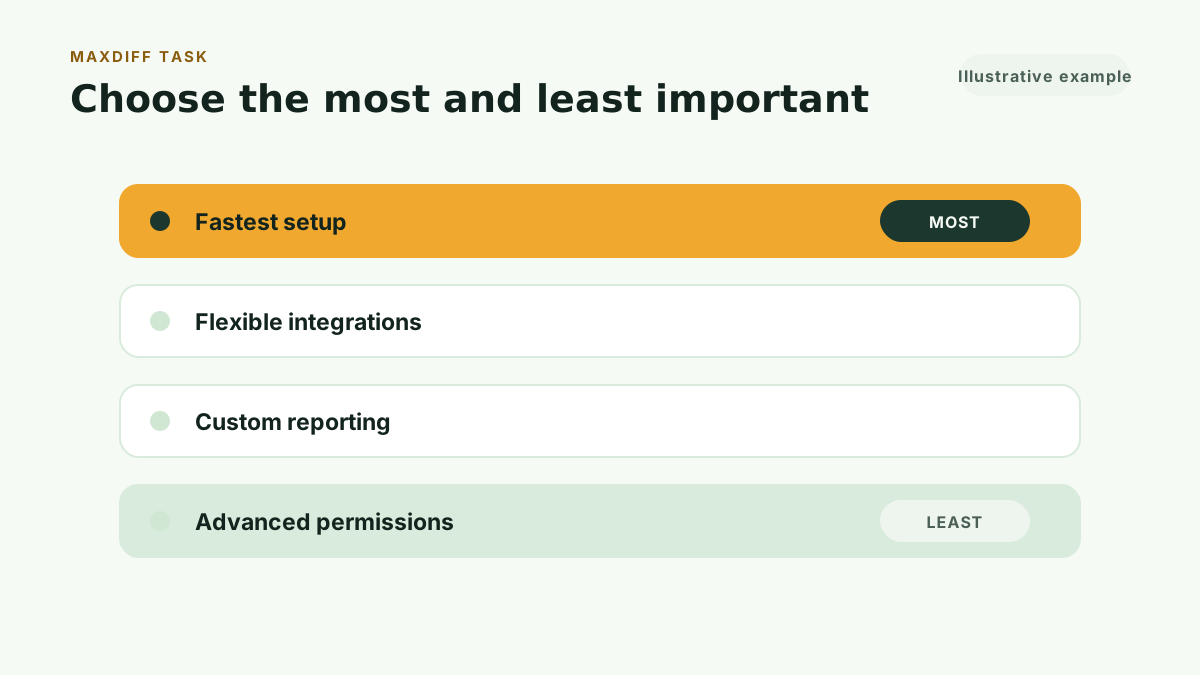
The survey repeats the task with different item combinations. A balanced design controls how often each item appears and which items appear together.
One task reveals a choice within one set. The full design creates enough comparisons to estimate the relative order across the entire list.
Do not show the full item list and ask for a complete ranking. Long ranking exercises create respondent fatigue and make middle positions hard to distinguish.
Recruit customers who face the trade-off
A feature ranking only makes sense for the audience you studied.
Current users can judge product capabilities through experience. Qualified prospects can judge benefits and outcomes when they understand the category. Buyers, administrators, and end users may produce different rankings because they carry different responsibilities.
Define the group before the study:
- Customer segment
- Role in the buying or use process
- Product experience
- Company stage or complexity
- Problem the product addresses
If two roles need different decisions, run separate studies or keep the groups distinct in the research plan.
Calculate relative utility
Each most-important choice adds positive evidence for an item. Each least-important choice adds negative evidence. The analysis estimates a utility or importance score from the pattern across all tasks and respondents.
The scores create a relative scale. The top item may receive an index of 100, with the other items scaled below it.
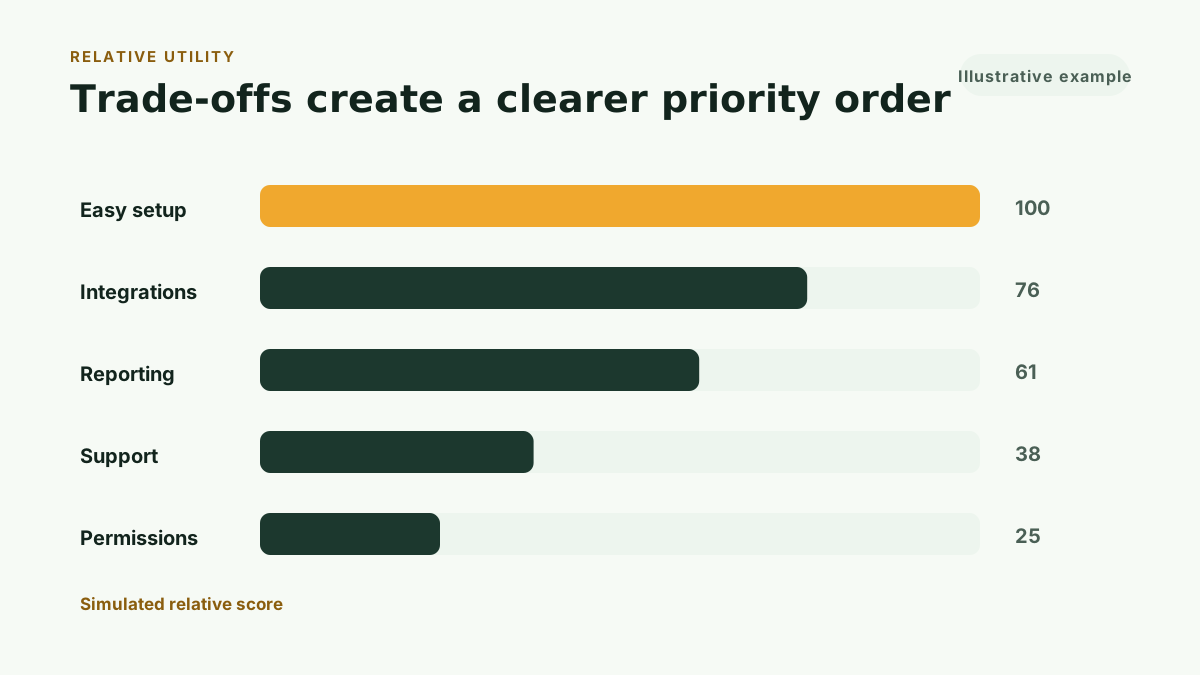
Read the spacing beside the order. A score of 100 followed by 98 shows a narrow difference. A score of 100 followed by 60 shows stronger separation.
The ranking can help you identify:
- A small group of leading priorities
- A middle group with weak separation
- A long tail of lower relative priorities
- Items that need clearer wording or a different audience
Use the result in a defined decision
Packaging
Use the ranking to identify features or benefits that may deserve greater weight in the offer. Add feasibility, cost, and segment strategy before moving a feature between plans.
Pricing-page messaging
Lead with benefits customers ranked above the rest. Review whether the page spends equal space on lower-priority details.
Product planning
Add the customer ranking to product evidence. Engineering cost, strategic fit, retention impact, and technical dependencies still belong in the roadmap decision.
Sales enablement
Give sales teams a tested priority order for the audience. Keep claims tied to the segment that completed the study.
Research follow-up
Use the result to choose topics for interviews. Ask why the leading items matter and why lower items lost the trade-off.
Keep relative and absolute importance separate
Standard MaxDiff ranks the tested items against one another. It does not establish an absolute line between important and unimportant.
Sawtooth Software’s guidance on anchored MaxDiff explains that standard scores sit on a relative scale. Respondents cannot state that every tested item is important or that none of them is important through the standard best-worst task.
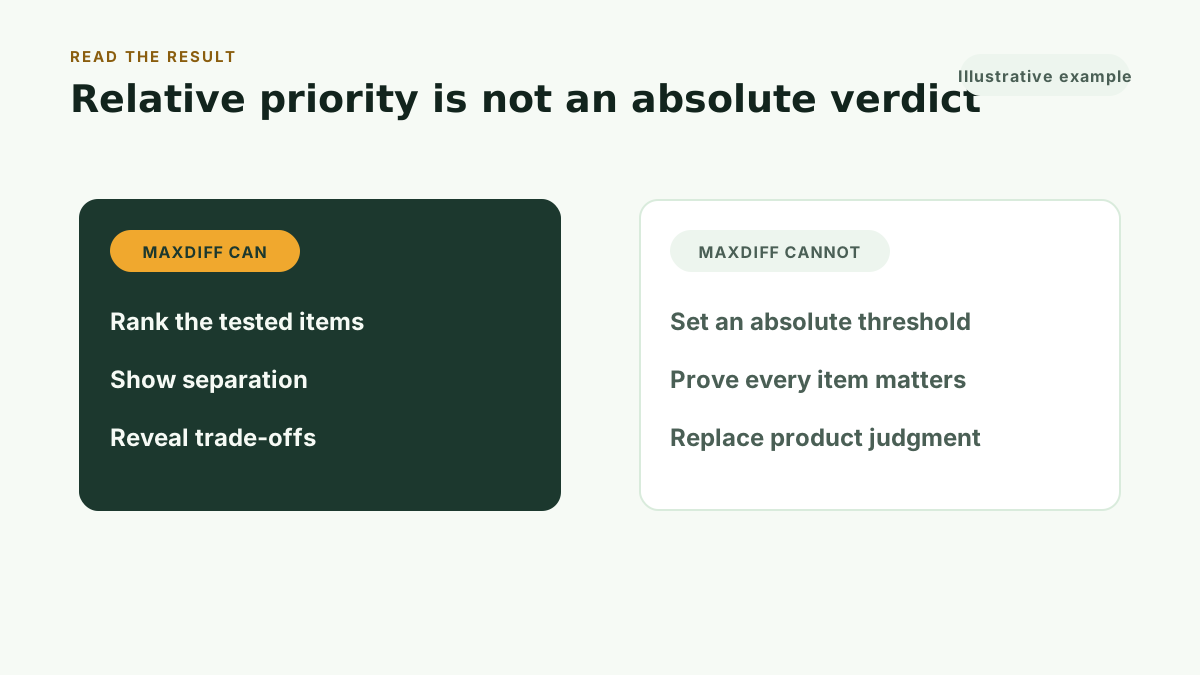
This distinction changes the language you use:
- Supported: “Customers ranked easy setup above the other tested features.”
- Unsupported: “Every customer requires easy setup.”
- Supported: “Advanced permissions had the lowest relative score in this set.”
- Unsupported: “Advanced permissions have no value.”
Preserve the item set and audience beside every claim.
Avoid five MaxDiff mistakes
Testing a weak item list
The analysis cannot rescue overlapping, vague, or mismatched options. Review the list with customers or customer-facing teammates before launch.
Combining features and outcomes
Compare like with like. A concrete feature and a broad business outcome operate at different levels.
Reading the top item as a roadmap
Customer priority contributes evidence. Product strategy still accounts for cost, differentiation, retention, and technical sequence.
Calling the scores absolute
Standard MaxDiff produces a relative ranking within the tested set.
Hiding the audience
A ranking from small SaaS founders should not become a claim about enterprise administrators. Label the group.
MaxDiff vs conjoint analysis
MaxDiff and conjoint analysis both force trade-offs, and they answer different questions.
MaxDiff ranks individual items. It takes one list, such as features, benefits, or messages, and produces a relative order by asking respondents to choose the most and least important option in small sets. The output shows which items carry weight. It says nothing about price.
Choice-based conjoint studies whole packages. Respondents choose among realistic offers in which price, limits, and features vary together, so the analysis estimates how much each attribute and each price level drives the choice.
Choose MaxDiff when you need to rank one list, such as shortening a long feature set before packaging work. Choose conjoint when you need to see how customers trade off complete offers, such as designing or pricing tiers. The two also work in sequence: MaxDiff narrows the list, then conjoint analysis tests the surviving levers inside full packages.
Connect MaxDiff to pricing
MaxDiff can strengthen a pricing decision without testing price itself.
Use it before packaging to learn which benefits carry the strongest relative preference. Then use CBC Conjoint when you need customers to choose among packages with different prices and feature combinations.
The methods answer different questions:
- MaxDiff ranks individual items.
- CBC Conjoint studies package trade-offs.
- Van Westendorp finds an acceptable price range.
- Gabor-Granger compares defined prices.
Start with the decision, then choose the method. Our overview of how to test SaaS pricing with real customers walks through that choice.
Run this method with your users
Kinetic Pro includes unlimited customer-recruited MaxDiff, Van Westendorp, Gabor-Granger, and CBC Conjoint studies, plus Kinetic Workspace, for $99 per month or $990 per year. The monthly plan starts with a 30-day free trial: card required, cancel anytime.
For a single decision, Kinetic Pricing’s MaxDiff study costs $279. You define the audience and item list, share the generated survey with your customers or prospects, and receive:
- Balanced four-item choice tasks
- Relative utility scores
- A ranked priority view
- Sample guidance
- Exportable response data
- A decision-focused narrative grounded in the calculated results
Start 30-day free trial to run this method with your users, or Buy one study when a long list of features or messages needs a customer trade-off.