What four SaaS giants get right about pricing, and where they leave money on the table
Calendly, Notion, Loom and Grammarly scored across eight dimensions of pricing-page craft. The average was 77, and the weakest dimension was the same for all four.
Steal the craft, skip the privileges (locked section)
Sources (locked section)
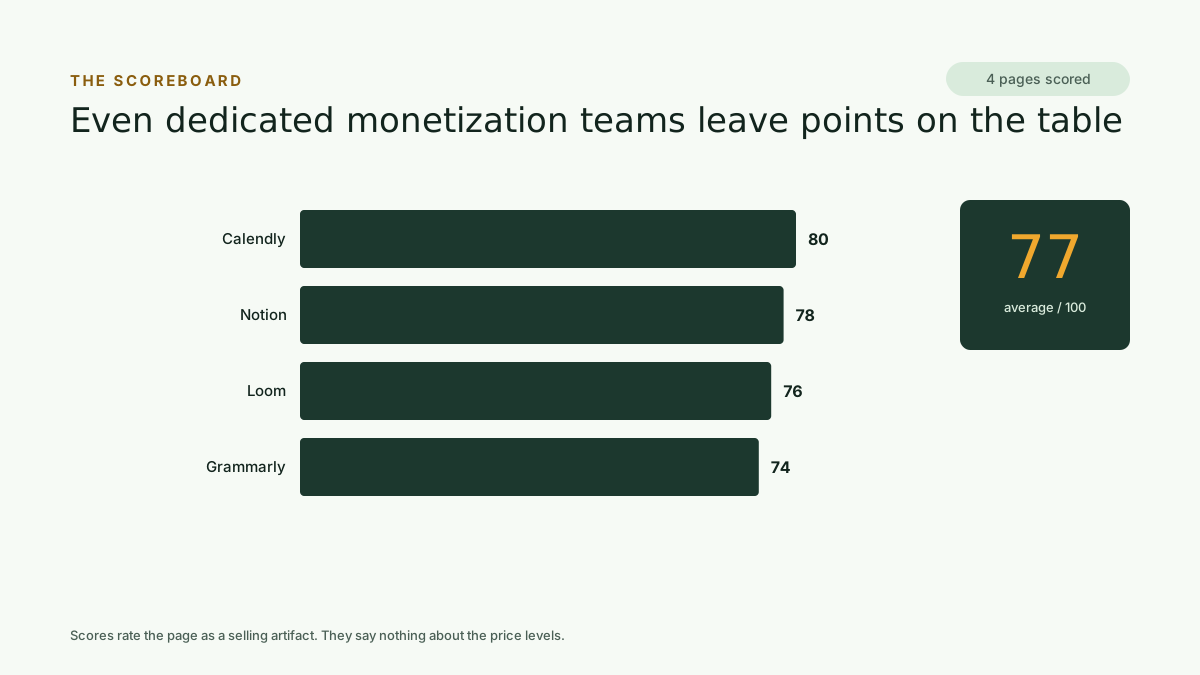
Calendly, Notion, Loom and Grammarly all run dedicated monetization teams. Their pricing pages average 77 out of 100.
That leaves 23 points of craft unclaimed by companies with every resource to claim it. More usefully for anyone pricing a smaller product: the points they lose cluster in the same places, and those places are cheap to fix.
How we scored them
The Kinetic teardown engine scored four public pricing pages, rating each 0 to 100 across eight dimensions of pricing-page craft and pairing every dimension with a written critique and a concrete fix.
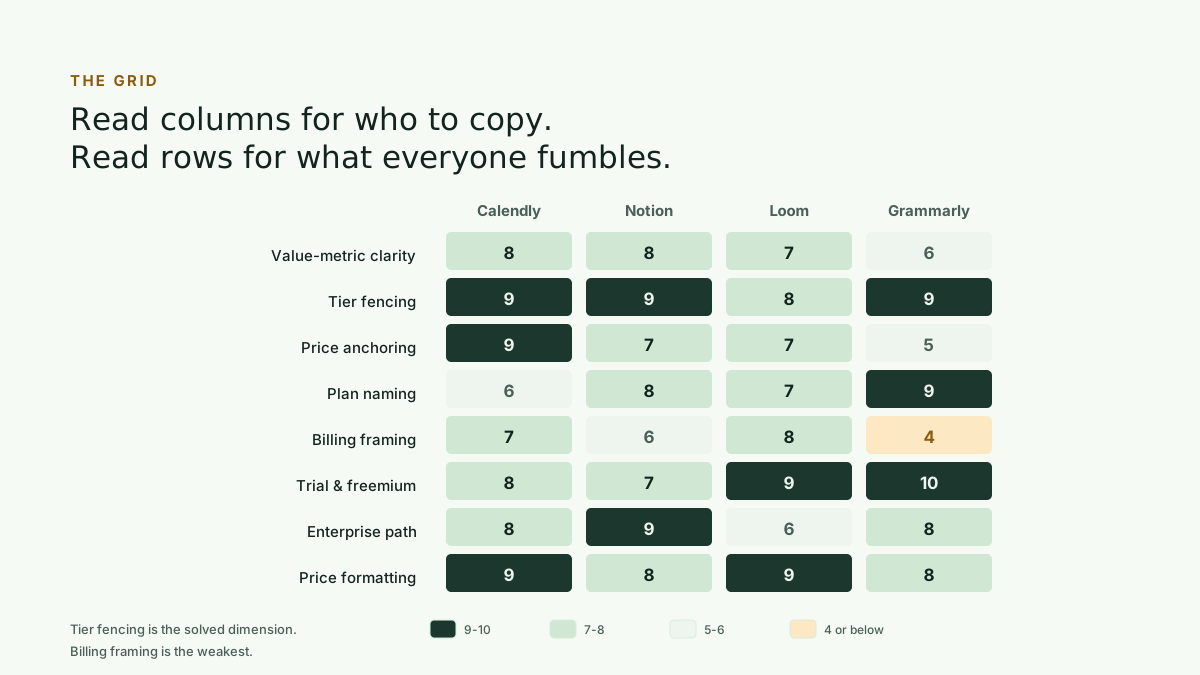
The eight dimensions are value-metric clarity, tier fencing, price anchoring, plan naming, billing framing, trial and freemium logic, enterprise path, and price formatting.
Scores reflect each page as a selling artifact: clarity, anchoring, fencing and friction. They say nothing about whether the underlying price levels are right.
The scoreboard
Even dedicated monetization teams leave points on the table.
Calendly leads at 80, followed by Notion at 78, Loom at 76 and Grammarly at 74. The spread is narrow, which is itself informative: these are four different products sold to four different buyers, and they converge on the same standard of craft.
Keep reading — it’s free.
Enter your email to unlock the remaining 7 sections of this report and download the full files. We’ll send the download links to your inbox too.
One email with your links — no drip sequence. Kinetic Pro members and trialists get instant access.
The grid
Read the columns for who to copy. Read the rows for what the whole industry still fumbles.
The columns tell you who to learn from on a given dimension. The rows tell you where the category as a whole is weak, and the rows are the more useful read.
Fencing is a solved science
Tier fencing averaged 8.75, the one dimension nobody fumbled. Every page scored 8 or above.
The shared technique is worth naming precisely: the pros fence on usage and collaboration, and leave core value untouched.
Calendly gates round-robin scheduling and CRM routing to Teams. The free tier's single-event-type limit does the upgrading on its own.
Notion fences with page-history windows, moving from 7 to 30 to 90 days, and file-size caps. These are limits that only bite once you have committed.
Grammarly locks style guides and brand tones to organisation tiers, converting individual affection for the product into company-wide contracts.
Steal this: fence on limits that grow with usage, not on features that gut the core product.
The missing anchor
Price anchoring averaged 7, and the reason is structural. Most pages hide their top-tier price behind Contact Sales, which forces a buyer to compare the paid tier against free. That makes $12 feel like a cost rather than a bargain.
The exception proves the tactic. Calendly states $15k/yr on its Enterprise card, and its $10 to $16 plans look like pocket change beside it. It scored 9 out of 10 on this dimension, the highest anchoring score in the study.
Steal this: state a high anchor, even a soft one. A visible expensive tier is what makes your real tier feel cheap.
The billing-toggle shell game
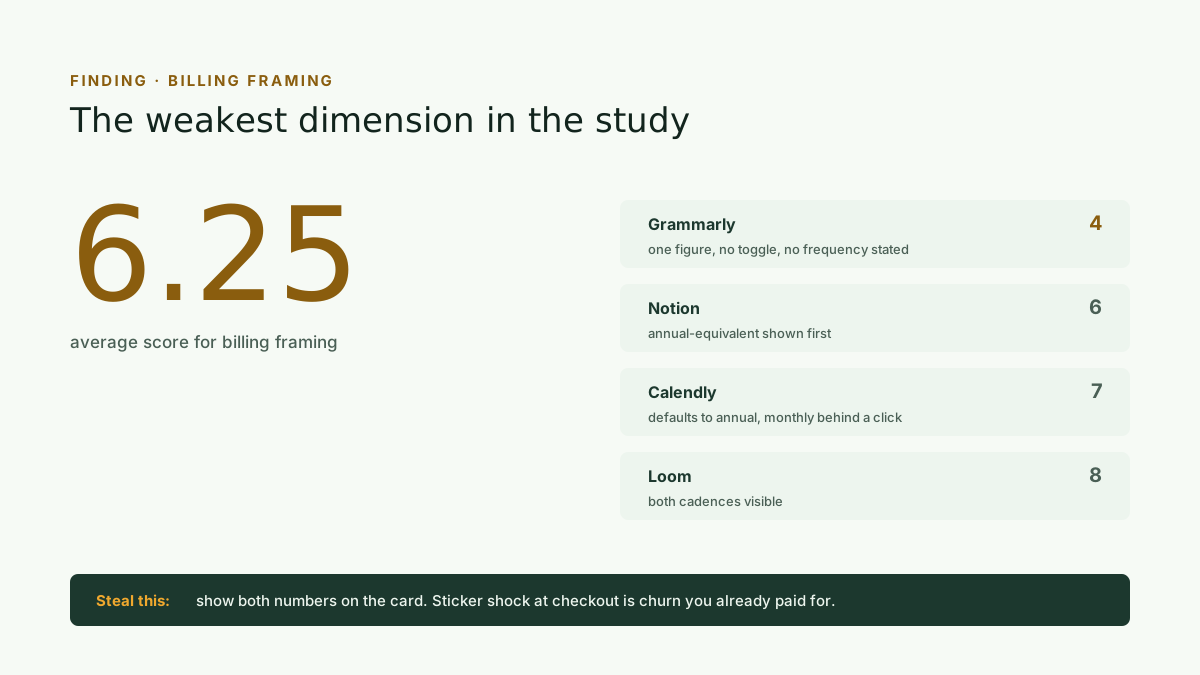
The weakest dimension in the study, and the cheapest to fix.
Billing framing averaged 6.25, the weakest dimension in the study.
The pattern is a specific piece of misdirection: display the discounted annual-equivalent rate, and let the buyer discover the real monthly price at checkout.
Grammarly scored 4 out of 10 with a single $12 figure, no toggle, and no billing frequency stated until checkout. Even top-scorer Calendly defaults to annual rates and puts the month-to-month price behind a toggle click.
Sticker shock at checkout is churn you already paid to acquire.
Steal this: show both numbers on the card. $18/mo billed annually, $22 billed monthly. Trust converts better than the lower sticker.
Trial terms hide in the FAQ
Trial and freemium logic averaged 8.4, but the losses were concentrated in one habit: most pages make you scroll to the FAQ to learn how long the trial runs. That is friction at the exact moment of highest intent.
The masterclass is Grammarly at 10 out of 10. Both $0 payment today and an email reminder 2 days before trial ends sit directly on the page, killing renewal anxiety before it forms. Calendly and Loom both bury their 14-day durations.
Steal this: put the terms on the button. Try free for 14 days, no card required beats Try for free every time.
Steal the craft, skip the privileges
Steal from the pros: fencing on usage limits that grow with commitment. Whole-number prestige pricing, $10 rather than $9.99. A stated enterprise anchor, even a soft one. Risk-reversal microcopy at the call to action, such as $0 today. Persona-named tiers a buyer can self-select into.
Skip what they get away with: hiding the real monthly price behind a toggle. Contact Sales as your only top-tier signal. Vague limited trial tags with no quotas. Seat ambiguity, where a buyer cannot tell whether a price is per user or flat. Any pricing opacity your brand has not yet earned.
Sources
Scores were produced by the Kinetic teardown engine in July 2026. Every figure traces to that run. Quoted page text is reproduced as it appeared on the run date, and pricing pages change.
68 AI pricing pages scored across eight dimensions. Billing framing is the dimension that separates a good page from a bad one, and half the category skips it entirely.
When does a self-serve pricing study answer the question, and when do you actually need a consultant? A decision guide with published cash and time comparisons.